 PhloMetric
Water Meter Gateway
The Gateway is the seam between the radio mesh and the IP network. It listens around the clock for LoRa readings from Node devices, holds them in a local queue, and POSTs them as JSON to a Windows ingest service running elsewhere on the LAN. If that service is offline, the queue keeps growing until it comes back, and no data is dropped.
It also runs the management plane: a client roster of every Node it's heard from, daily "By Node" usage emails, and a small command surface for poking nodes remotely: set a default meter, clear a database, ping for connectivity, reboot.
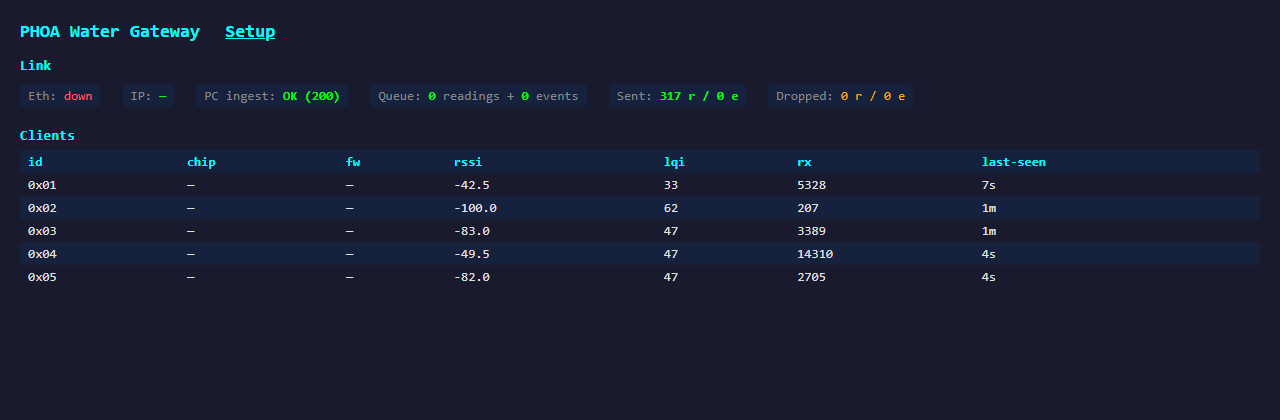
What it does, in plain English
A Node decodes a meter and sends a packet to the Gateway over the 903.9 MHz LoRa mesh. The Gateway receives it, acknowledges it (so the Node knows to stop retrying), adds it to a per-meter ledger (so it can compute interval flow rates even when meters don't report flow themselves), and queues it for upload. A background task drains the queue by POSTing batched JSON to a FastAPI ingest service on the local PC at port 41290, which writes the readings into MySQL.
If the PC is rebooting, on a different network, or just busy, the gateway keeps the queue and retries. The dashboard shows the queue depth, last HTTP response code, and a running drop counter so you can see at a glance whether the pipe is healthy.
Key features
- LoRa mesh hub. Receives readings from up to 32 nodes over a 903.9 MHz LoRa link and acknowledges every delivery, so Nodes retry until the Gateway has confirmed each reading. Auto-tracks a client roster: each node's meter and latest reading in gallons, plus RSSI, packet count, and last-seen. A flow marker on the roster flags any node whose volume is currently climbing, so you can watch usage without opening a node. Links of 600 m run in the production deployment with decode margin to spare.
- HTTP ingest with retry buffer. Batches readings and events into JSON payloads and POSTs them to a FastAPI endpoint at
http://<pc-ip>:41290/ingest. Buffers locally when the PC is offline and drains on reconnect, so no readings are lost. - "Record to Database" toggle. A persistent on/off switch on the
/setuppage, right inside the Database Host card next to the ingest service IP and port. Default is off: the mesh still runs, the dashboard still shows readings, and the daily email still goes out, but nothing is written to MySQL until you opt in. Setting survives reboots. - Fixed / static IP option. A WiFi IP Address card on
/setuppins the Gateway's station IP instead of taking a DHCP lease, so its address never shuffles after a router or power blip. DHCP stays the default; you set the address, router, subnet, and optional DNS, and it reboots to apply. A bad entry safely falls back to DHCP and is recoverable on the fallback AP or the serial console. NVS-backed, so it survives reboots. - Optional W5500 Ethernet. Compile with
#define HAVE_W5500to use a wired uplink on the SPI bus (CS=5, RST=22). Falls back to WiFi if the link is down. - Fallback WiFi AP. Always broadcasts a dedicated access point so distant Nodes that can't see the home AP can still associate and relay their readings via the Gateway. Credentials are shown on the Gateway's own
/setuppage once you're on the LAN. - Accepted-node allow-list. An Accepted Nodes card on
/setuppins the set of node IDs this Gateway will roster, ACK, and record. Default is blank, meaning accept all, so a single installation is unaffected. On a dense site where another installation's Nodes might share the mesh, list only your own node IDs: everyone else is dropped on arrival, before the roster, the ACK, and the database, while still showing under/api/rxlogfor troubleshooting. The check is keyed on the originating Node, so your own Nodes' relayed readings still pass. Applies live, no reboot, and survives power loss. - Live dashboard. Client roster, ingest status, queue depth, dropped counts, mesh TX/ACK counters, all visible at the gateway's IP. Per-row checkboxes and a "Delete selected" button let you forget retired or stale nodes without a reboot.
- Remote mesh commands. Send
set-default-meter,clear-db,reboot,ping,query-status, per-field queries, andset-samplingto any node by ID, over the mesh, without needing direct WiFi reach. Commands queue on the Gateway and ride the reply to the node's next check-in, so they deliver within about a minute even to a node with no WiFi at all. - Daily "By Node" email. Each morning, sends a summary of each Node's default-meter reading to every configured recipient, one message per address so recipients never see each other. Supports add/remove recipients without rebuild, and an optional report-node filter so a report can cover only the node IDs you list.
- Leak & break alerts. The Gateway learns each Node's normal per-interval water usage and flags any Node using far more than normal (a possible leak), with the warning persisting in every report until usage returns to normal. A separate fast-break tier watches instantaneous flow and sends an immediate off-schedule alert email when a Node's sustained flow crosses a threshold (a likely pipe break). A trend alarm keeps a second, slower baseline that is frozen while usage is elevated, catching the smaller but sustained rise of a slow leak or schedule creep that the big-spike alarm misses. Thresholds are tunable on
/setup; a low-usage floor keeps pulsed/maintenance valve actuations from skewing the learned baseline. - Off-schedule usage alert. Tell the Gateway when irrigation normally runs (a nightly window, wrapping midnight if needed) and it accumulates each Node's water use falling entirely outside that window, emailing an immediate alert when the same-day total crosses a gallons threshold. Built for hourly-reporting meters (GIF2014W-OSE endpoints, see reporting cadence) where a broken line never produces the dense readings the flow-based break tier needs: daytime water at irrigation scale is caught at the first hourly register update. Readings that cannot be attributed cleanly (window-straddling deltas, multi-hour catch-up batches from weak links) are ignored rather than guessed at, so relayed traffic cannot false-trigger.
- Per-node irrigation schedules. Store each Node's intended controller program on the Gateway: watering days (day-of-week checkboxes, an every-N-days interval, or odd/even calendar days), start time, and per-valve runtimes (up to 8 valves, run back-to-back). A Node with a schedule is judged by the off-schedule alert against its own window (start through total runtime plus a small slack) instead of the global nightly window, and watering on a day its schedule says is off raises an alert no matter the hour, the signature of a forgotten controller program or a stuck valve. Reviewed and edited one node at a time on
/setupwith a node selector; day math is DST-safe and a wrapped window past midnight stays attributed to its start day. Nodes without a schedule keep the global-window behavior. - Node liveness & offline alerts. Every Node checks in at least once a minute, flowing or idle, and the check-in works even if the node's meter radio has a problem, so the two failures are distinguishable. If a Node goes silent for 10 minutes the Gateway emails an offline alert, and a recovery notice when it reports again. Silence means something.
- Flow synthesis. Computes interval-average gallons-per-minute at the gateway from consecutive volume readings, handy when meters themselves don't transmit flow.
Specs
| MCU | ESP32 dual-core (Heltec CT62 footprint) |
|---|---|
| Mesh radio | SX1262, LoRa @ 903.9 MHz (SF10 / 500 kHz), every reading ACKed, 60 s node liveness |
| Uplink | WiFi 802.11 b/g/n + optional W5500 Ethernet (compile flag) |
| Ingest target | HTTP POST to Windows / FastAPI service on LAN port 41290 |
| Fallback AP | Dedicated SSID for stranded nodes during commissioning; credentials shown on the Gateway's /setup page |
| Firmware | 0.3.0 (observable at /api/gw-diag) |
| OTA | POST /update with new .bin; HTTP-only (no PuTTY needed) |
Web endpoints
All endpoints are HTTP on port 80 of the Gateway's WiFi (or Ethernet) IP.
GET / | Dashboard: client roster with each node's meter and latest gallons, ingest status, queue, mesh stats. |
|---|---|
GET /setup | Configuration page: WiFi credentials, ingest target, email settings, command cards. |
POST /update | Firmware upload (multipart). |
GET /api/gw-diag | JSON: gateway firmware, Ethernet link, ingest health, queue depth, mesh counters. |
GET /api/clients | JSON of connected nodes (id, chip, fw, RSSI, LQI, packet count, last seen, plus each node's meter_id and last reading last_volume_gal). |
GET /api/config | JSON: ingest target, mesh ID, timezone, record-to-DB flag, the accepted-node allow-list (allow_nodes), and WiFi IP settings (ip_static, ip_addr, ip_gw, ip_mask, ip_dns). POST any subset to update; allow_nodes applies live, a static-IP change reboots to apply. |
POST /api/cmd/<op> | Remote mesh commands: reboot, clear-db, set-default-meter, ping, query-status, set-sampling. Optional {"node_id": N} in the body to target a single node. |
GET /api/node-volume?node_id=N | On-demand gallons for one node: drives a live mesh query and returns JSON (volume_gal, meter_id, protocol, last_decode_age_s, RSSI). Reports the node's freshest decode, not a forced meter read. Add &warm=1 to wake a cold/relayed node first. A plain-GET convenience wrapper over /api/cmd/query-status. |
POST /api/passwords | Change the AP/OTA or Setup password (NVS-backed); POST /api/passwords/reset returns both to the factory default. |
GET /api/email | JSON: schedule config, recipients, the report-node filter (report_nodes), and the alert thresholds (leak_mult, leak_min_excess, leak_min_usage, break_flow_gpm, trend_mult, trend_min_excess, quiet_min_gal, quiet_win_start, quiet_win_end) plus any_flagged. POST any subset to update interval / send time / report filter / thresholds (not password-gated). |
GET /api/email/preview | JSON: live per-(node, meter) registry with the exact numbers the email uses, raw wire units plus floored display gallons, baseline, interval delta, RSSI, age, and the per-node leak state (node_normal_gal, node_last_gal, node_flagged). For diffing the in-RAM state against the database. |
GET /api/schedule | JSON: the per-node irrigation schedule table (mode, days or interval, start, per-valve minutes) plus live-derived runs_today and in_window_now per node, so a schedule can be sanity-checked with curl without waiting for a watering run. POST replaces the whole table atomically; friendly spellings accepted ("days":["mon","wed"], "start":"23:00", "anchor":"YYYY-MM-DD") and any invalid entry rejects the whole request with a per-node reason. |
POST /api/email/add_recip | Add an email recipient. |
POST /api/email/del_recip | Remove an email recipient. |
POST /api/email/send_now | Trigger immediate "By Node" report. |
Setup page
The /setup endpoint is the Gateway's management console. From a single page you point it at a PC ingest service, toggle MySQL recording on or off, pin a fixed/static WiFi IP (or leave it on DHCP), set the timezone, change the protocol on any remote node over the mesh, set the default meter, clear a node's database, ping or reboot a wedged node, run per-field queries to recover edge-of-range nodes, and schedule the daily "By Node" email, all without leaving the gateway's web UI.
The Email Reports card also carries the anomaly controls. A Report nodes field scopes the report to a list of node IDs (blank = all). A Leak & break alerts block sets the leak alarm sensitivity (usage ≥ a multiple of that node's learned normal, and a minimum gallons above normal), a low-usage floor that keeps pulsed or maintenance valve actuations out of the learned baseline, the sustained-flow GPM threshold for the immediate break alert, the trend-alarm sensitivity for sustained modest rises, and the off-schedule rule (gallons threshold plus the nightly irrigation window) for immediate alerts on daytime water use. Each node's learned normal is shown on its line in the report; a flagged node carries a red banner and the email subject is prefixed so a leak is visible without opening the message. These controls apply immediately and are not password-gated.
The Irrigation Schedules card records each node's intended watering program, reviewed one node at a time through a node selector: pick the watering days on a horizontal day-of-week row (or an every-N-days interval, or odd/even days), set the start time and the per-valve minutes, and the card shows the computed watering window and whether that node waters today. Save All writes every node's schedule in one step. With a schedule stored, the off-schedule alert judges that node against its own window and flags watering on off days at any hour.
The Passwords card changes the Gateway's two independent passwords, both shipping as a factory default: the AP/OTA password securing the WiFi access point and firmware updates, and the Setup password for this login. A one-click reset (or the resetpw serial command) returns both to the factory default, so a forgotten password is never a lock-out.
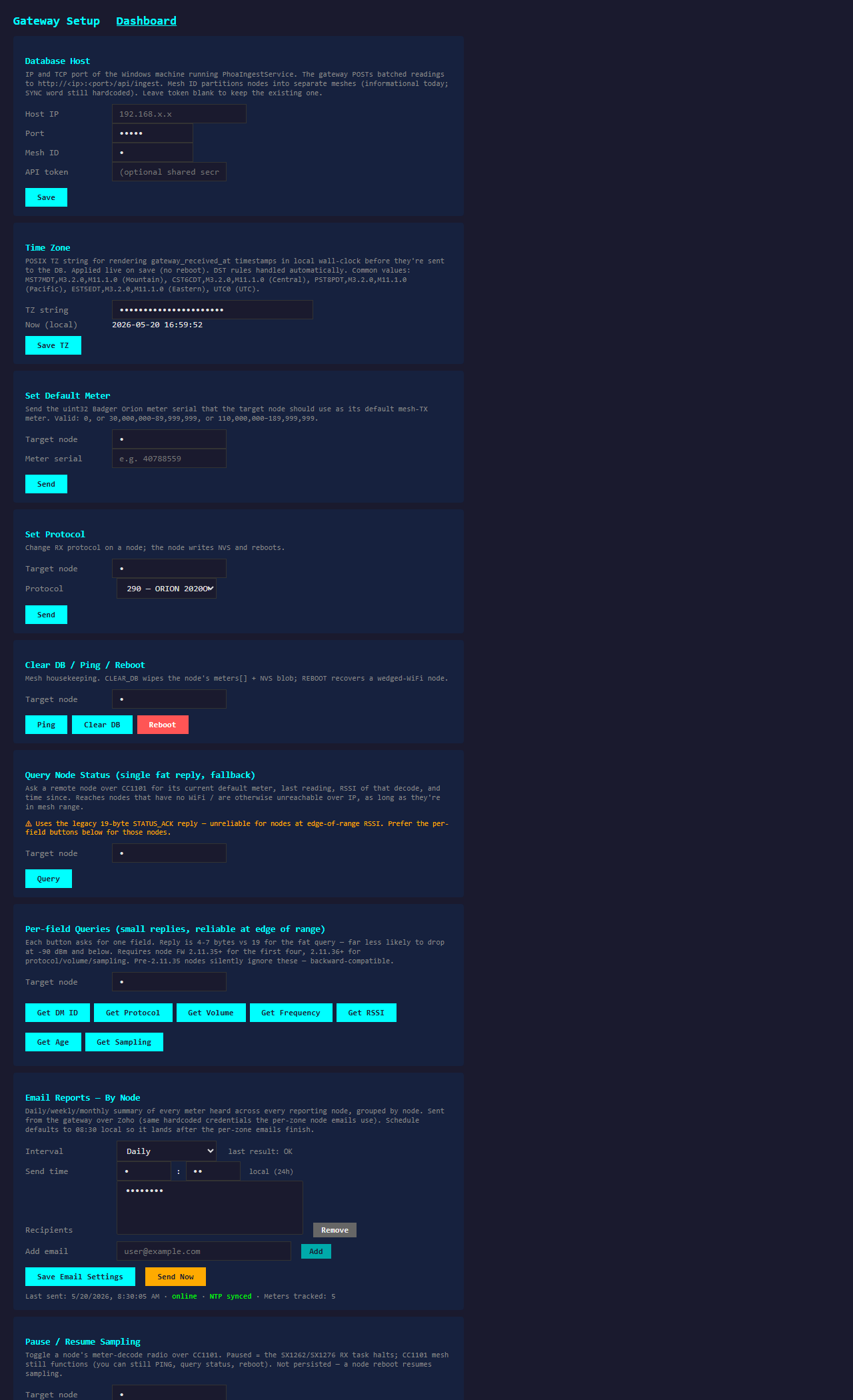
/setup page with sample values · the Accepted Nodes card pins which node IDs the gateway records; the WiFi IP Address card pins a fixed station IP; the Database Host card houses the Record to Database toggle; the Email Reports card holds the Report nodes filter and the Leak & break alerts thresholds, including the trend alarm and the off-schedule rule's irrigation window; the Irrigation Schedules card at the bottom reviews each node's watering program one node at a timeSample "By Node" email
Every morning the Gateway sends each recipient a short usage summary, one line per Node showing the latest reading from that Node's default meter, plus daily and monthly volume. Recipients receive the same content directly in their inbox, no login required.
TBD / unit Buy a Gateway or request a quote
For agents
A structured spec of this device is available at /api/gateway.json. The page above is also annotated with schema.org/Product JSON-LD in <head>.